
How to Start a New Conversation in Layla (and How That Differs from Continuing or Deleting One)

Starting a new conversation in Layla creates a fresh chat thread and leaves your existing conversations untouched; continuing conversations you want to keep; and deleting removes a conversation from your list for good. They sound similar and they are easy to mix up, but they do three different things to three different things.
This guide covers what each action actually does, the exact steps for each, the confirmation dialogs you will see, and how to decide which one you want. Everything here happens on your device — there is no cloud copy of any of it.
The three actions are not the same
The confusion usually comes from thinking of these as "ways to get rid of a chat." Only one of them gets rid of anything permanently. Here is the distinction in one place:
Start a new conversation — makes a new, empty thread. Your old conversations stay exactly where they were. Nothing is lost. You are just walking into a clean room.
Continue a conversation — keeps the same thread, loading all your past conversation history into the model context
Delete a conversation — removes the thread itself from your conversation list. It is gone, along with its messages.
A useful way to hold it: new adds a thread, continue continues a thread, delete removes a thread.
There is a second thing people conflate: the difference between what you see on screen and what the model can remember. Scrolling up in a long chat shows your full history, but the model only "sees" as much as its context window allows; older turns beyond that are handled separately. Starting a new conversation gives the model a genuinely clean slate. Clearing does the same for the thread you are in. (For more on how the chat screen and its menus are laid out, see The Layla Chat Screen Explained.)
How to start a completely new conversation
Use this when you want a fresh start but want to keep your existing chats. There are
several ways to do this
Start a new conversation from the Welcome Screen
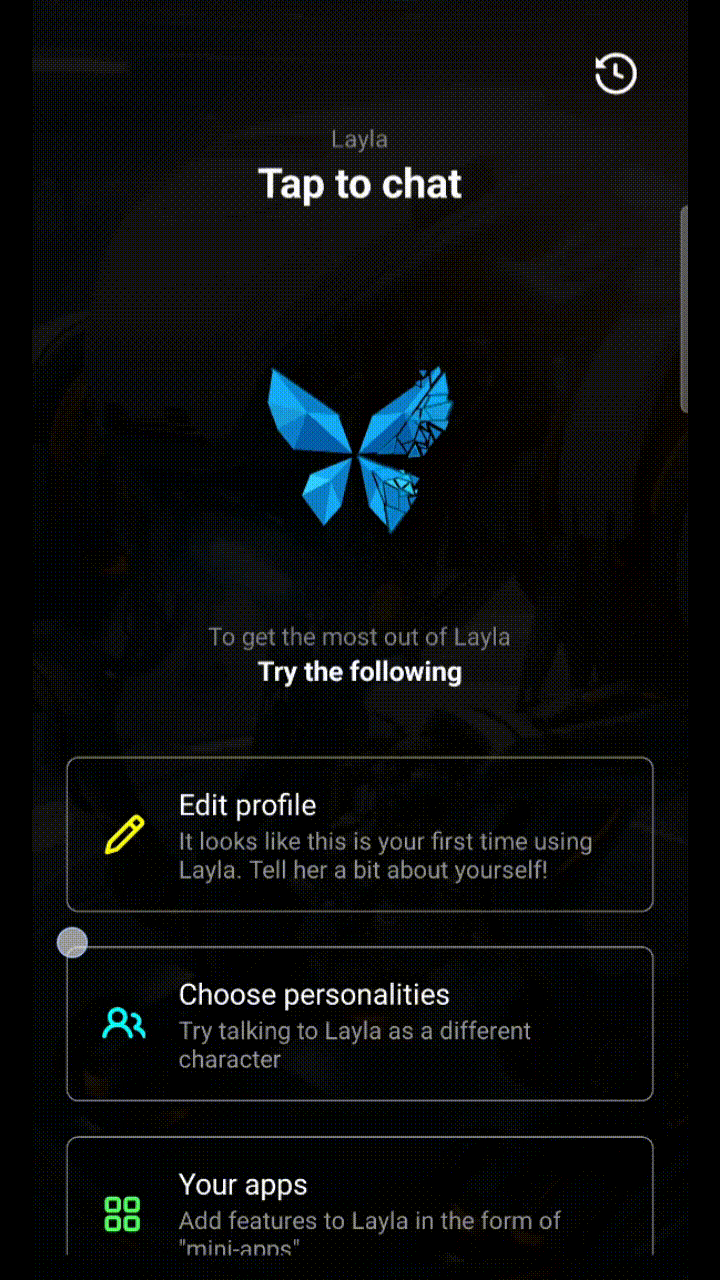
The Welcome Screen is the page you see in Layla where it shows the big blue butterfly (or your default character if you've configured one). This page is your main entry point to Layla!
You can start a new conversation here by just tapping on the big icon in the centre of the screen.

Start a new conversation from the chat history area
You can start a new conversation in the chat history area with any characters by using the avatar icons at the top of the sliding chat history area.

Start a new conversation from the character selection page
You can also start a new conversation in the character selection page, when you select a character.

A new, empty thread opens. Your previous conversations are untouched and still available in your conversation list. Because the thread is empty, the model starts from just the character's greeting and system prompt — no earlier turns are carried in. This is the right choice when a chat has drifted into a pattern you cannot steer it out of and you would rather start clean than keep fighting the existing context.
Starting a new conversation does not ask for confirmation, because nothing is being destroyed — you are only creating something new.
How to continue an existing conversation
You can continue your conversation at anytime in Layla. There are several ways to do this, either during character selection or viewing your chat history.


How to delete an existing conversation
Use this when you want the conversation gone from your list altogether.
Go to your conversation list.
Select the conversation you want to remove.
Choose Delete (the trash icon)
A confirmation dialog appears
Confirm to delete, or cancel to keep it.
One thing to note: because Layla runs fully offline and stores everything locally, a deleted conversation is genuinely gone. There is no server-side copy and no cloud backup to restore from. That is the point of an on-device app — but it also means the confirmation dialog is the only safety net, so read it before you tap through.
Which one should you use?
The chat is stuck or off-topic, but you want to keep it. Start a new conversation. Your existing chat is preserved and you get a clean context.
You want to continue a conversation. Continue it.
You are cleaning up your list, or removing something for privacy. Delete it. This is the only option that actually frees the space and removes the record.
If your goal is simply a clean context for the model, note that you do not have to delete anything — starting a new conversation is usually the answer, and it is non-destructive.
What about memory?
Layla can remember details about you across conversations through its long-term memory. That store is maintained separately from any single chat thread, so removing or clearing one conversation does not necessarily wipe what Layla has already learned.
FAQ
Does starting a new conversation delete my old ones?
No. A new conversation is an additional, empty thread. Your existing conversations remain in your list and are not changed.
Can I recover a conversation after deleting it?
No. Layla stores conversations locally with no cloud backup, so deletion is permanent. The confirmation dialog is your last chance to cancel.
Do any of these actions send anything off my device?
No. Creating, clearing, and deleting conversations are all local operations. Nothing about your chats leaves your phone.
Starting fresh, continuing, and deleting are three deliberately separate actions because they answer three different needs — a clean slate, a reused-but-emptied thread, and a permanent removal. All three run on the device in your hand, with no account and no connection, which is also why the confirmation dialog matters: on a fully offline app, what you delete is yours to lose.


Comments